![Group 10709 (4).png]](https://kb-x9t3q.besignal.com/hs-fs/hubfs/Group%2010709%20(4).png?width=60&height=60&name=Group%2010709%20(4).png)
Your account information and preferences (name, alias, notification language, etc.) are only accessible if you have an active account on the platform, via the "Pro Access" button.
To log in to Pro Access:
Updating your information and preferences
Once logged in, click the user icon at the bottom of the left navigation bar, then select "My profile".
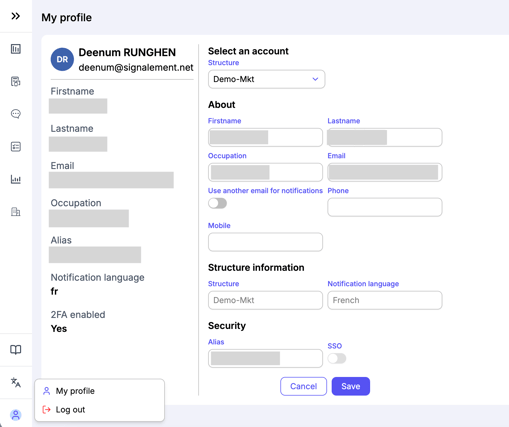
On the page that opens:
-
Select your organisation first to load your information.
-
You can then update the following:
-
First and last name
-
Job title (optional)
-
Phone number (optional)
-
Mobile number (optional)
-
Once your changes are made, click "Save" at the bottom of the page to confirm.
⚠️ Your login email address cannot be changed.
Notification email
You can choose to receive automatic platform notifications (new case, new message, status change, etc.) at a different email address from the one you use to log in.
To do this, enable the "Use a different email address for notifications" option, then enter the address you want to use.
⚠️ For security reasons, some notifications, such as account creation emails and authentication codes (for 2FA users), will always be sent to your login email address.
Notification language
If your platform is available in multiple languages, you can choose the language in which you receive automatic email notifications (new case, new message, status change, etc.).
To update it, select your preferred language in the "Notification language" field of your profile.
Alias (messaging)
An alias is a display name case managers can use instead of your first and last name when sending messages on the platform. It lets you keep your identity confidential when communicating with reporting parties or other case managers, in line with your organisation's confidentiality rules.
Once set, your alias is used by default in all messaging channels you are part of. You can disable it for a specific channel if needed.
⚠️ You can set up an alias only if your organisation has enabled the option. Else the field will not be displayed.